Apples Script: A Calligraphy Font for Craft and Design
Where This Font Truly Shines
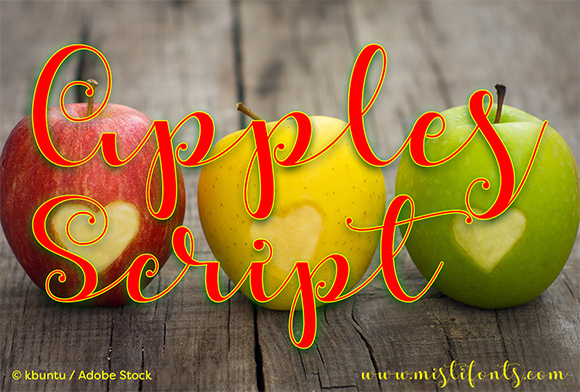
Apples Script isn't just another script font sitting in your collection. It carries a distinct calligraphic warmth that feels both personal and polished, striking that sweet spot between casual handwritten charm and professional elegance. The letterforms flow with natural, connected strokes that mimic the rhythm of actual pen work—something that's surprisingly hard to find in digital typefaces.
What makes this premium font stand out is its versatility across so many different creative contexts. Wedding stationery designers reach for it when they need invitations that feel romantic without being overly formal. Boutique shop owners use it on product labels to convey artisanal quality. Bloggers and content creators incorporate it into their social media graphics to add personality that generic sans serif fonts simply can't deliver.
The visual character of Apples Script leans toward modern calligraphy rather than traditional copperplate. You'll notice slightly irregular baselines and varied stroke widths that give it authenticity. It doesn't look machine-perfect, and that's precisely the point. That organic quality makes viewers feel like a real person crafted the message, which builds immediate connection and trust.
Practical Applications Across Industries
For packaging design, Apples Script works beautifully on product names, taglines, and accent text. Imagine a small-batch candle company using it for the scent name on a kraft paper label, or a bakery featuring it on their signature pastry boxes. The font communicates handcrafted care without sacrificing legibility at reasonable sizes.
In editorial design, this typeface serves as an excellent choice for pull quotes, chapter headings, and feature article titles. Magazine layouts benefit from its ability to break up dense blocks of body text set in a complementary serif font or sans serif font. The contrast creates visual interest and guides readers through the page naturally.
Small business owners building their brand identity often struggle to find fonts that feel distinctive yet approachable. Apples Script fills that gap effectively. Coffee shops, florists, photography studios, and lifestyle brands have all used similar calligraphic scripts to establish a recognizable visual voice. The key is pairing it thoughtfully—more on that shortly.
For logo design, this font offers a strong foundation for brands targeting audiences who appreciate warmth and authenticity. It works particularly well for businesses in wellness, beauty, food, hospitality, and creative services. However, keep in mind that script fonts in logos sometimes need slight adjustments to letter spacing and sizing to achieve optimal balance.
Getting the Most From Font Pairings
Every experienced designer knows that a display font like Apples Script rarely works alone. The real magic happens when you pair it with the right companion typeface. A clean, geometric sans serif font creates a contemporary contrast that keeps layouts feeling fresh and readable. Think of Apples Script handling headlines while a font like Montserrat or Open Sans manages body copy and supporting information.
If your project calls for something more traditional, pairing it with a classic serif font like Garamond or Playfair Display can produce an elegant, layered composition. This combination works especially well for wedding materials, upscale restaurant menus, and editorial spreads where sophistication matters.
When testing font pairings, pay close attention to x-height compatibility. Apples Script has a moderate x-height, so companions that are too tall or too short can create awkward visual tension. Set sample text side by side at actual project sizes rather than relying on how fonts appear in your design software's preview window.
Readability and Real-World Considerations
Honesty matters here: no script font should handle extended paragraphs or small body text. Apples Script is a creative font designed for display purposes—headlines, titles, short phrases, and accent copy. Using it for anything longer than a sentence or two will frustrate your audience and undermine your design's effectiveness.
Size plays a critical role in readability. At larger sizes, the calligraphic details of Apples Script come through beautifully, creating that desired handwritten aesthetic. Below roughly 18 points, those same details can start to blur together, especially on lower-resolution screens or textured paper stocks. Always test your specific output method before committing to final production.
Letter spacing is another practical consideration. Modern typography best practices suggest adding slight tracking to handwritten fonts when setting them in all caps. Apples Script includes both uppercase and lowercase characters, and mixing them naturally—as you would in actual handwriting—typically produces the most authentic results.
Licensing, Styles, and Making Your Decision
Before purchasing any commercial font, review the licensing terms carefully. Most premium font licenses distinguish between desktop use, web use, and application embedding. If you're a small business owner creating materials in-house, a standard desktop license usually covers your needs. However, if you plan to embed the font in a mobile app or use it extensively across a website via CSS, you'll likely need an extended web license.
Check what styles and weights come included with Apples Script. Many quality script fonts ship with alternates, ligatures, and swashes that add variety to your typesetting. Accessing these OpenType features requires design software that supports them, such as Adobe Illustrator, InDesign, or Affinity Designer. Learning to use alternates prevents the repetitive look that sometimes plagues script-based designs where identical letterforms appear too close together.
Evaluate whether the font fits your project by setting actual content in it before committing. Type out your business name, your tagline, or the specific phrases you need. Every typeface has letters that look better or worse depending on the characters involved, and certain combinations in calligraphic scripts can create unexpected connections or spacing issues.
Ultimately, choosing a font like Apples Script comes down to whether it serves your project's goals. Does it communicate the right emotional tone? Does it pair well with your existing design assets? Will your target audience respond to its personality? If you're working on craft projects, branding materials, marketing collateral, or digital content that benefits from a human, handcrafted touch, this calligraphic font deserves serious consideration in your modern typography toolkit.